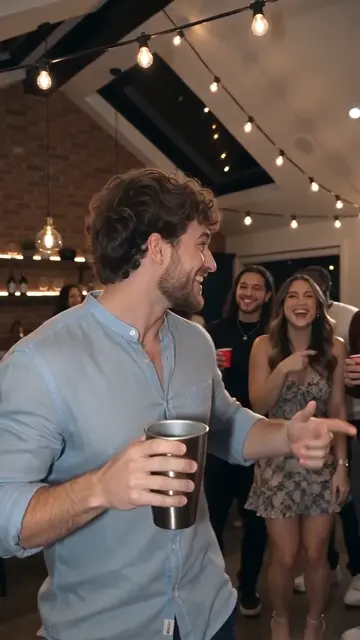
 00:00–00:05
Enter the party
The lead holds a silver cup and turns toward the cheering group.
Turn one portrait into a warm, crowded party scene: a silver cup, a close-up to camera, and friends celebrating behind you. Explore the creator’s sample and prepare your own version.
Choose Mini or Fast at 480p/720p, or Standard or 2.5 at 480p/720p/1080p. Select any whole-second duration from 5 to 15 seconds. New tasks enable native model audio. Credits vary with model, resolution and duration; confirm the quote before generating. The fixed effect is portrait; generic tools also support landscape and square.
Creator-provided reference: 15.04 seconds, 720 × 1280, silent. Your result uses your selected model, resolution and duration; the sample does not guarantee identical motion or timing.
The supplied clip is a party-performance version of the Burning Bridges AI idea. It uses warm string lights and a silver cup; it does not show a bridge on fire or establish an exact remake of a music video.
00:00–00:05The lead holds a silver cup and turns toward the cheering group.
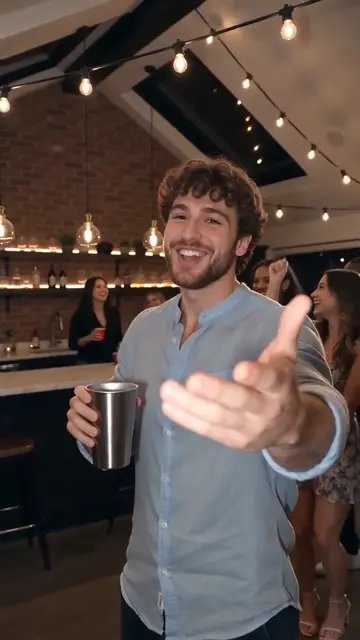 00:05–00:10
The lead comes closer and gestures to the camera, with the crowd behind.
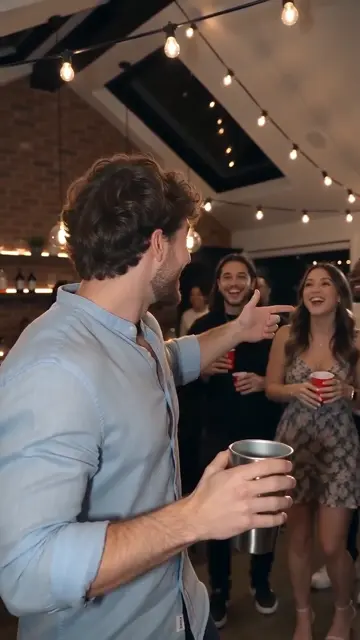 00:10–00:15
The lead turns back toward friends as the celebration continues. These frames describe this sample only.
Use a waist-up portrait of one adult, with a visible face and the outfit you want to keep. You can select it in the form above now.
Choose your model, resolution and duration. Confirm photo permission and the displayed credit quote before generating.
Find your completed MP4 in My creations. Review the result, download it, or scan the download QR code on your phone. Private media is retained for 30 days.
A photo and a written scene can guide a new party performance, but cannot promise the same choreography. Exact reference-following needs a separate, supported video-reference workflow. This page currently prepares the party-style route; the supplied sample does not prove either route works in this app.
Before sharing, check that your face and outfit stay consistent, the cup and hands look natural, and the lead remains distinct from the other guests. AI can change details between frames. Keep a local copy of a result you want to save.
Create a vertical, photorealistic party scene using the uploaded adult as the single foreground lead. Preserve their face, hairstyle and visible outfit. Warm string lights in a brick-and-timber venue, a few adult friends in the background. The lead holds a silver tumbler, turns toward friends, then smiles and gestures naturally to the handheld camera. Keep faces distinct and hands anatomically plausible. Gentle camera movement; no hard cuts, text, logos, celebrity likeness or named song. Generate an original performance, not a frame-by-frame music-video copy.
Practical help with choosing photos, understanding examples and knowing what to expect before creating.
Clear subjects, the right number of photos and permission to use them: a short checklist before you upload.
Read the guideLearn the difference between a reference sample, draft settings and a video delivered to your account.
Read the guideBuy credits once, or choose a subscription for regular creating. Pick a template and the settings that fit your idea.
One payment. No subscription. Pack credits never expire.
10 credits≈ 1 standard video
$6.99 once
≈ $6.99 per standard video
One-time USD payment
50 credits≈ 5 standard videos
$29.00 once
≈ $5.80 per standard video
One-time USD payment
350 credits≈ 35 standard videos
$99.00 once
≈ $2.83 per standard video
One-time USD payment
900 credits≈ 90 standard videos
$199.00 once
≈ $2.21 per standard video
One-time USD payment
3000 credits≈ 300 standard videos
$499.00 once
≈ $1.66 per standard video
One-time USD payment
Savings compare the price per credit with the Single pack.
Video counts use Mini · 720p · 12s · 10 credits. Your model, resolution and duration determine the actual quote.
Confirmed technical failures return reserved credits. Pending results are checked before any adjustment.
Select a duration to compare credits per video. — means that resolution is unavailable for that model.
| Model | 480p | 720p | 1080p |
|---|---|---|---|
| StandardSeedance 2.0 Mini | 5 | 10 | — |
| FastSeedance 2.0 Fast | 8 | 17 | — |
| ProSeedance 2.0 | 10 | 20 | 50 |
| UltraSeedance 2.5 | 17 | 37 | 93 |
People use the name for AI party-performance videos, often associated with the “Where She At?” gesture. This page focuses on the cup-and-party variant shown above, rather than an actual burning bridge effect.
Buy a one-time credit pack, upload one photo and confirm permission. Choose a model, supported resolution and a duration from 5 to 15 seconds. The server confirms the credits and checks your inputs before generation.
The project owner supplied this AI-generated video. Its original input photo, model, prompt and run settings were not supplied, so it is a visual reference rather than a verified result from this app.
The page preview is silent; the original file is unchanged. No original song or word-perfect lip sync is promised for future results. Add music you are allowed to use when publishing.
Creator-provided reference: 15.04 seconds, 720 × 1280, silent. Your result uses your selected model, resolution and duration; the sample does not guarantee identical motion or timing.
Turn one portrait into a warm, crowded party scene: a silver cup, a close-up to camera, and friends celebrating behind you. Explore the creator’s sample and prepare your own version.
Prepare my photo